New Customer List
New Customer List
New Customer List report provides information on New Customers that have been brought in to the company. To open the list, click on the reports drop down on the side menu and click on New Customer List. You can expand the side menu by clicking on the three lines on the top left of the screen. The report can be filtered by the following
- Date Range - Shows New Customers added within the sdselected date range
- Brands - The brand the New Customers falls under
- Salesmen - Name of the Salesman that brought in the New Customer
- Service Types - The Services the customer wants provided
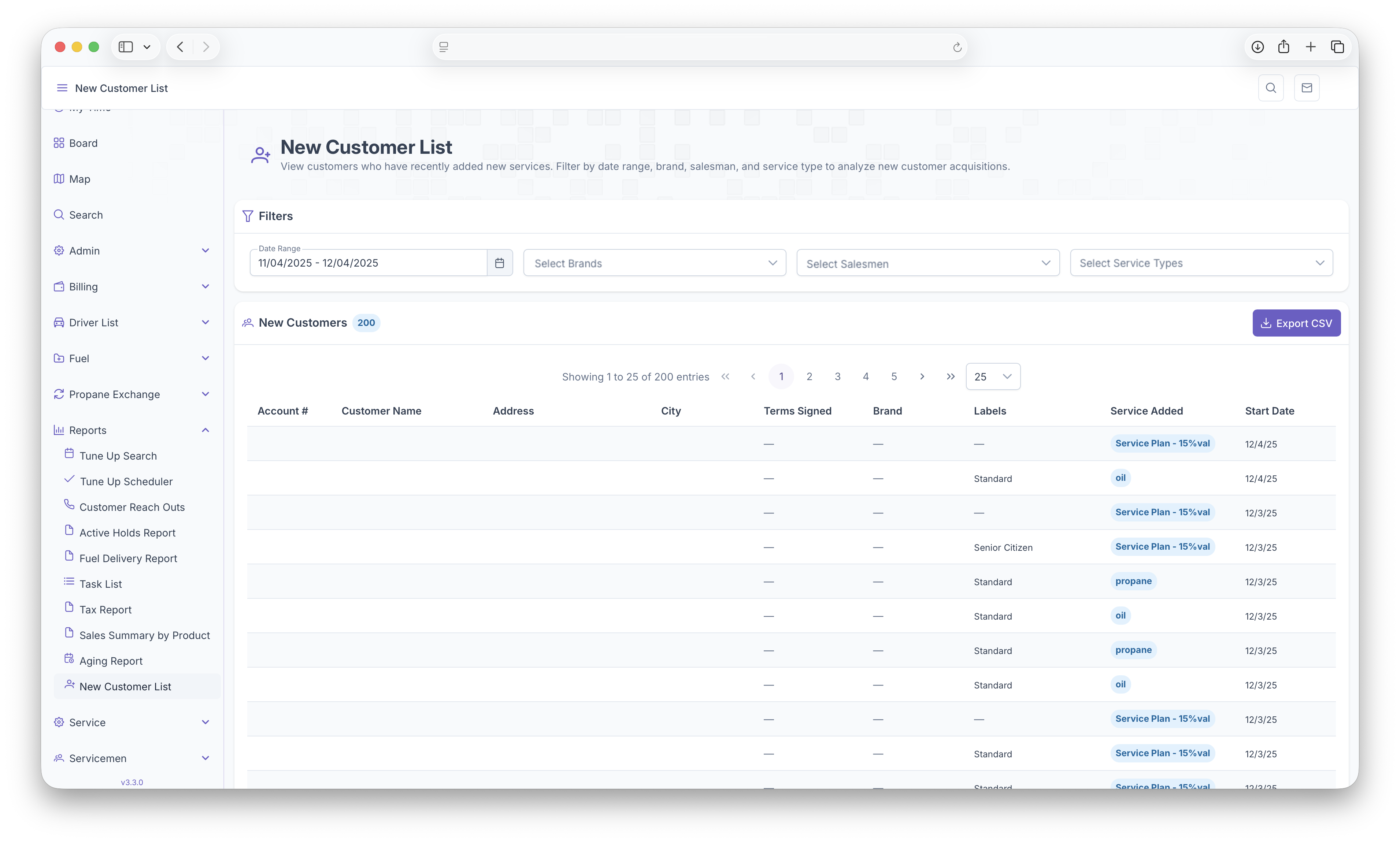
Once the filters are selected, a table will be generated that shows each New Customer as a line item with the followig columns
- Account Number - The Account number assigned to the new customer
- Customer Name - The New Customers name
- Address - The New Customers Address where services are being provided
- City - City of The New Customer
- Terms Signed - The date the terms were signed with the company and salesman
- Brand - The brand the New Customer falls under
- Labels - Labels that are assigned to the New Customers location
- Service Added - Displays all Services the New Customer requested
- Start Date - The start date of the service the New Customer requested
The table can then be exported for easier printing or sharing by clicking on the Export CSV button on the top right corner of the table