# Staging Loads
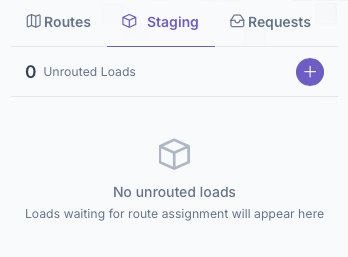
Next is setting up a load to add to a route. To start this process, click on the Staging tab next to the Routes tab to bring up the Staging toolbar
[](https://docs-kozyops-com-uploads.s3.amazonaws.com/uploads/images/gallery/2025-12/image-1766765406931-09-44-am.png)
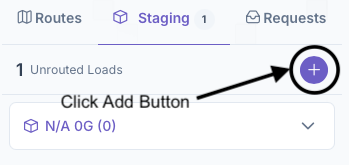
1. Click on the add button to add a load to the unrouted loads list
[](https://docs-kozyops-com-uploads.s3.amazonaws.com/uploads/images/gallery/2025-12/image-1766765877887-12-24-am.png)
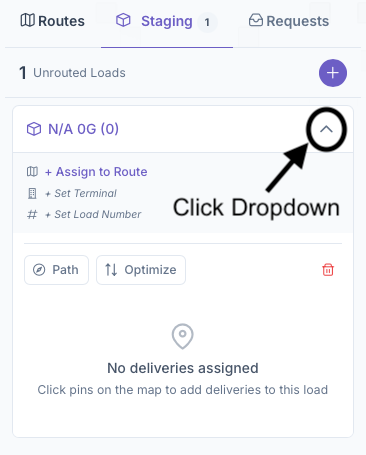
2. Next select a Load to work on and click on the arrow to bring up the Load Box dropdown
[](https://docs-kozyops-com-uploads.s3.amazonaws.com/uploads/images/gallery/2025-12/image-1766765960049-12-33-am.png)
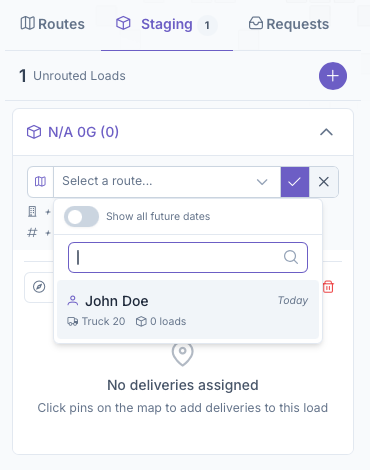
3. From here a route can be assigned to the load or it can be done after, but once added, the load will be moved into the routes tab under the Route selected
[](https://docs-kozyops-com-uploads.s3.amazonaws.com/uploads/images/gallery/2025-12/image-1766766094011-13-37-am.png)
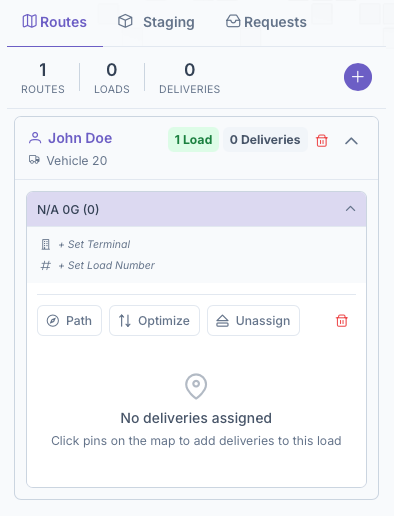
4. After which, if a route was added, continue back onto the routes tab and continue there by selecting the load under the route
[](https://docs-kozyops-com-uploads.s3.amazonaws.com/uploads/images/gallery/2025-12/image-1766766114188-14-01-am.png)
5. Click on Set Terminal then click the check after selecting one. Just like with Vehicles, a Terminal must also be created and added to the system for it to appear on here. See the [Terminals](https://docs.kozyops.com/books/admin/page/terminals) guide for a more in depth look at creating them
6. Click on Set Load Number and click the check after assigning a number